Getting the Latest Dev Build of Kristal
Have you tried to install a library or a mod (that came with a .zip) that simply doesn't work or load because you are using a out of date version (being for 0.11.0-dev) but you can't find it?
This means that the mod, or library is created using a newer version of Kristal not yet as an release, but you can get the latest devbuild of Kristal if you well... follow this (and compile to an .exe, i guess)
The Normal way
Requirements
For getting the latest dev build, you may need:
- Git (if you are cloning from the terminal, optional)
- LÖVE 2D to be able to compile it
- Python to be able to run
build.pyafter cloning Kristal's Source Code
When you get all of the requriments, you need to clone the source code!
git clone https://github.com/KristalTeam/Kristal.git
Link to the Kristal's code here
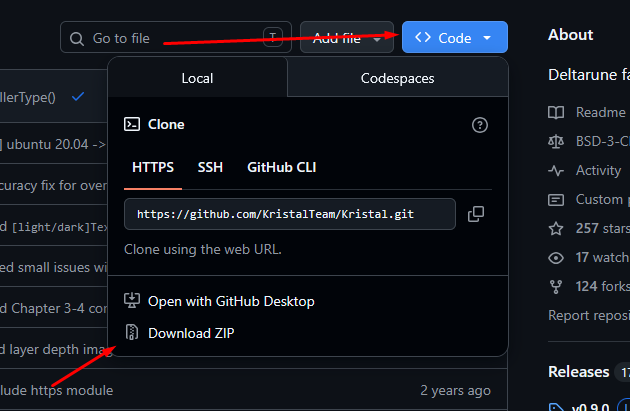
- Inside of the code, click the "Code" button
- Click "Download ZIP" to download Kristal's Source
Building the thing
Hold up
This section goes for Windows (i use windows, not Mac), if you are on Linux or MacOS, you can follow Kristal's Releasing Projects for their own sections, if you are on Android/iOS, you need to follow LÖVE's guide instead
First things first:
You need to set LÖVE to your System PATH so it can build Kristal, depending if you got LÖVE via the Installer or zipped, the path does vary
- On your Windows Start Menu, Search for
environment variablesand if it appearsEdit the system environment variables, open it (Click "Yes" on the UAC Prompt) or in the search box typeSystemPropertiesAdvancedand run it, it takes to the same thing - Under "System Variables" find "Path" and click "Edit"
- Make a new entry with "New" containing the PATH of your LOVE (if you installed via the installer, the path is
C:\Program Files\LOVE) and make sure it is to the very top, then click "Ok" on all to apply the changes
If you have any terminal open, you need to reopen them again so it knows the new PATH
Secondly, you may need to edit build.py inside of an editor and find kristal_path and change it to an dot, like this:
kristal_path = "."
Finally, you need to install 2 extra depdencies that allows Kristal to build the program, on your terminal run:
pip install grope pe_tools
Finally, run:
python build.py
Then viola! your Kristal is now compiled, under the folder build/executable and you can play with the mod/lib that is for 0.10.0 dev somehow
The easiest way
Yes, there is an easy method without all of the above for some reason
Requirements
For getting the latest dev build, you may need:
When you get all of the requriments, you need to clone the source code!
git clone https://github.com/KristalTeam/Kristal.git
Link to the Kristal's code here
- Inside of the code, click the "Code" button
- Click "Download ZIP" to download Kristal's Source
- If you have the .zip of your 0.10.0 version of kristal (if you don't have it, install it), make a copy of the executable and open the contents of the executable (because you can see it)
- Simply drag the entirely of the source code (of version 0.11.0) (except .github, and .git (if show hidden files is enabled)) into the executable and replace it
You're done, you are now on 0.11.0, you can play with mods
Some Note
IF you have created a library/mod from 0.10.0 before it's upgrade YOU might need to update the version to 0.11.0 (so it doesn't get confused on the version bottom left) and because it's a new version, breaking changes DO occur from what you were doing before (or API changes/new APIs) from what version to another
Inside of mod.json:
{
// The ID of your project. Should be unique!!
"id": "envt",
// Displays on the main menu.
"name": "envt",
// Displays underneath the name. Optional.
"subtitle": "",

// The version of your project.
"version": "v1.0.0",
// What version of the engine your project was made with.
"engineVer": "v0.10.0", // <-- (changing that to v0.11.0-dev)
Inside of lib.json:
{
"id": "meow",
"version": "v1.0.0",
"engineVer": "v0.10.0"  // <-- (changing that to v0.11.0-dev)
}