For when you are doing a Custom Web Shop for your Server
If you are making a custom shop because the features of Tebex, or CraftingStore are not for you, you probably need to think what you are doing before you actually create, and host it
In literal not nerdy for anyone who is just wanted to do so
Heads Up
Since you own it, and don't rely on a service that handles it (Tebex or CraftingStore) YOU are the responsible for when someone chargebacks (With extra fees), or disputes the payment on your account, which can get into actual problems, if you are someone who can't handle it, contact a professional
When Making the Shop
When doing the shop, make sure that (at least):
- When doing the code, use something like Vue, Next.JS, or any other, but, do not make it a HTML/JS type of website, which is already bad (for when relying on client-side validations and trusting it, compared to checking it server-side first, An example is running a script that changes the donation to 0.01€ before PayPal embeds and actually paying 0.01€)
- Make sure you are the account holder and you are the one who receives the payments depending which payment processor you use, including if you actually read the service's Terms of Service and Privacy Policy
- If doing an API with Vue or Next.js (or via serverless functions), make sure there's rate limiting (Which allows you put a stop on how many requests can be sent to which API, coming from where), if there are not rate limits in the api, anyone (if they know how), can spam your api!
- If when processing data and/or orders (Sending data) or similar, you need to create an actual Terms of Service and Privacy Policy on your website, this is important, which is legal stuff of what your website does process, if you do not add it, then you are probably gonna get in legal issues or charges
- Put secret values (that aren't meant to be shared) on a
.envor.env.localbut never commit them (Depending if the provider is powered by services that you put your code on as git repositories) - (Optional) If the hosting provider allows, and if you own a domain, connect that domain to your environment or deployment instead of letting it use the default hosting provider's free domain, which makes it more sus for any person who wants to buy something from your store
For when making an .env for testing on your computer, do not commit to the repository, if someone has access to your account, they can use it for bad thingies, instead, create a .gitignore file (if it exists, open it) and add:
*.env*
Which makes any file ending on .env do not commit (otherwise the template for Vue/Next.JS already add this)
If you followed all of the above, then your thing is to host it
When Hosting the shop
If you want it to host at no money because you really want it, some services (depending on how it's handled) on its free tier are either:
- Aren't powerful on resources (CPU)
- Can shutdown if nobody touches the website for a certain amount of time to power resources for other things hosted
- Or doesn't allow you to sell stuff (take real payments) on its free tier (Depending on their Terms Of Service)
When choosing a service, make sure you know if it is ok to use
If those services connect via .zip files, it is useful, if however, is limited to services that power repositories, when making the repository, make sure it is private!
If you are a Vercel User
If you are hosting your shop deployment to vercel because you think vercel is cool, and if you are on the hobby plan (noticed on the Vercel's Homepage when signed in via the top left) then you are breaking their Terms Of Service, since it doesn't allow you to sell under that plan, since if you are hosting via the hobby, you are making it as a personal projects, and you cannot do commercial stuff (Reference here)
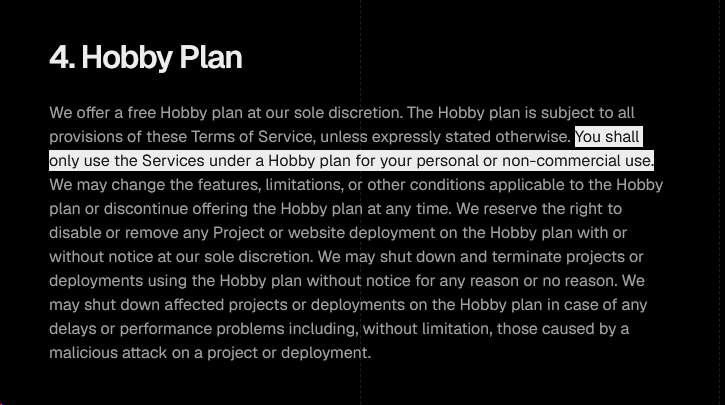
if you are gonna host it there, you need to upgrade your team's plan to (at minimum) Pro ($20/Month), those seen here or via the Vercel Page (when signed in) if clicking on your user and clicking the "Upgrade to Pro" button
Also as a small little note: You have a limit on how many requests it can be sent from your deployments, if they hit the limit, your deployments is paused for a little while until it recovers back up!