Minekube
This describes how to setup a custom domain to your Minekube endpoint
This applies to all plans, Free and Paid (Plus at 10$/mo at the time of writting)
Little Notes
If you are a free user, regardless of the domain it will go to Minekube's Browser Tab when your server goes offline, which you can disable in the Plus plan for 10$/mo
First go to your registrar's DNS Records and depending which way you want (an easy or hard way) set the name where you want your server to go to then add it as follows as said below:
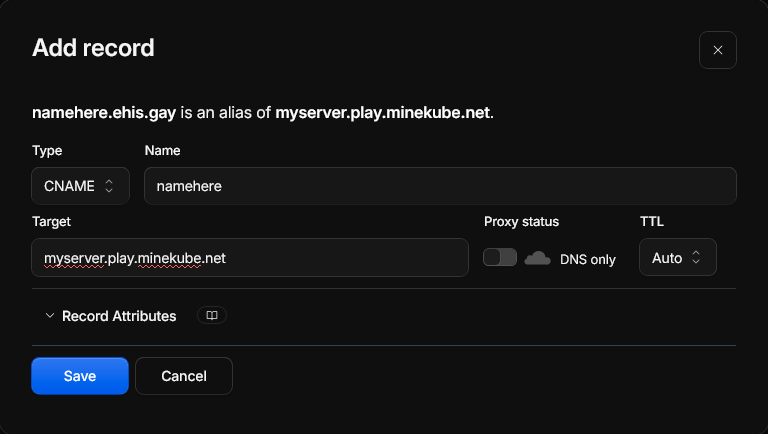
Via CNAME Records
When adding the CNAME record you simply point it like this:
- Name: Whatever as you please
- Target:
<name.play.minekube.net> - DNS Proxy set to false if you are using cloudflare
Via SRV Records
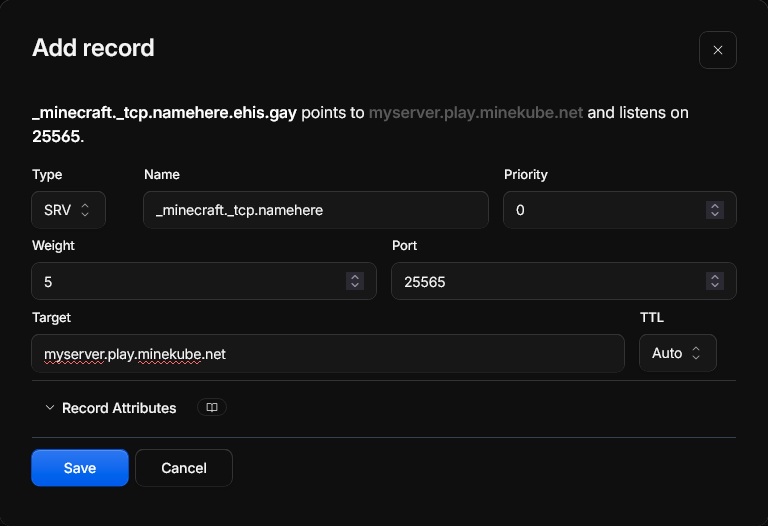
When adding the SRV record you simply point it like this:
When adding the name value:
If your domain you verified IS a subdomain add a dot at the end followed by its subdomain name, for example _minecraft._tcp.survival but if your domain verified isn't a subdomain, then leave the name value as it is as your registrar will point it to your parent domain
- Name / Host:
_minecraft._tcp(or_minecraft._tcp.<subdomain>for a subdomain) - Priority: 0
- Weight: 5
- Port: 25565
- Target:
<name>.play.minekube.net
Adding the domain
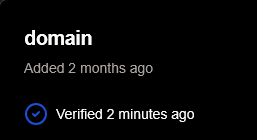
Go to your Minekube Dashboard, select your organization and go to Endpoints --> Your Endpoint, then go to Custom Domains and add that domain you added to the records and click on "Add", it will be verified once it says "Verified x seconds ago"
Add the IP to your multiplayer list, if it redirects you to your server you're done! but if it redirects to the Minekube Hub (Compass on a void world) then the server is down